

OneDose Launches Spaces: EMS Protocol Management, SOPs, and Operations Guides in One App
September 19, 2026
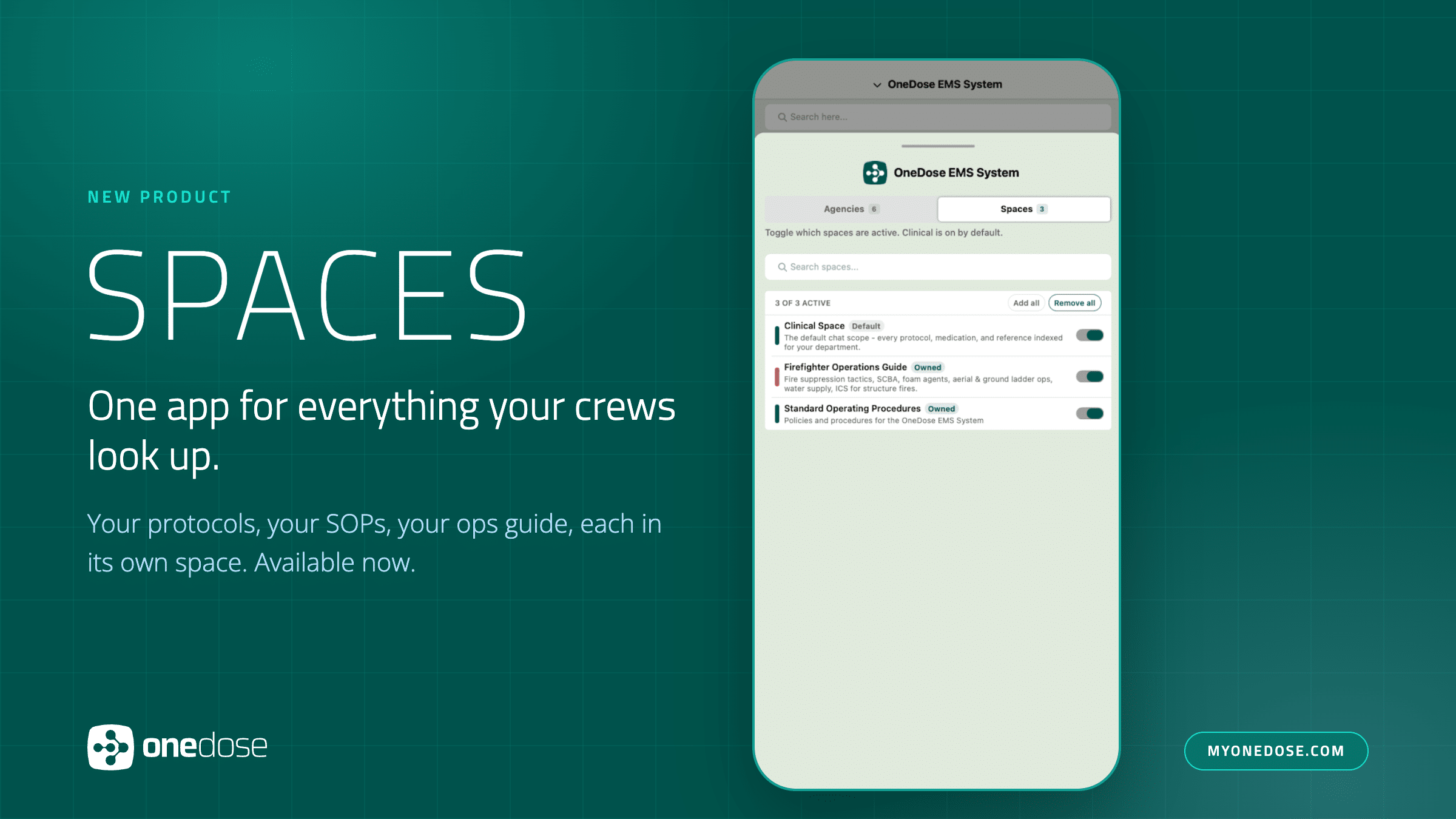
One app for everything your crews look up.
Introducing OneDose Spaces, a new product that lets EMS and fire agencies keep their clinical protocols, standard operating procedures, operations guides, and training material in the OneDose EMS protocol management platform as separate libraries, each shared with exactly the crews that need it, and each one the OneDose AI Assistant can be pointed at or steered away from for any given question.
Every agency runs on several kinds of documents. There are the clinical protocols, which OneDose has always handled. Then there is everything else: the SOP binder, the fire operations guide, the infectious-disease transport procedure, and more. Those additional policies and files usually live on a shared drive, in a three-ring binder, or on an intranet nobody opens on a call. Spaces brings it into the app crews already have open, without mixing it into the clinical protocol list.
How Spaces works
A space is a named library with its own folders and documents. Every department starts with a Clinical Space that holds everything OneDose has always contained. Any additional space an agency creates, such as “Standard Operating Procedures” or “Firefighter Operations Guide,” works exactly the same way: same folder tree, same document viewer, same draft-to-publish-to-archive lifecycle, same review process. Administrators have nothing new to learn, and a medic who never turns on a second space sees the same app they use today.
What administrators get
In the OneDose admin console, a space switcher sits at the top of the sidebar, in the same place administrators already use to move between agencies. Whatever space is selected governs everything beneath it: Folders, Database, Notifications, Archive, Protocol Sets, and Review all follow the active space. A Manage Spaces view lists every space with its type, how much it holds, and who can reach it. Each space carries its own audience. It can stay private to the owning agency or be shared across an organization, either to every agency or only to named ones, with per-person access where a single individual needs it. A space shared to another agency is read-only for that agency.
What field crews get
On the phone, the switcher crews already use to change agencies gains a second tab for spaces. Clinical is on by default. Turn on more, and the Protocols tab sections the folder list by space so a medic can jump straight to the SOPs or the ops guide. Content from the medic’s own agency is stored on the device and available offline, the same as protocols.
The OneDose AI Assistant reads the spaces the user has switched on for that conversation, and only those. A medic can ask a question of the SOPs alone, the protocols alone, or everything at once. The answer is organized by the space each finding came from, and medication references return as live dose cards.
Why it matters
OneDose ships new capability every month, and Spaces is the step that turns an EMS protocol management app into the single place an agency keeps everything its people need to look up. A medic searching for a cardiac protocol should not be wading through personnel policy, and an operations manager editing SOPs should not be able to disturb clinical content. Spaces gives each body of knowledge its own container, its own audience, and its own place in the app, while the AI Assistant lets the user decide the scope of every answer.
“Agencies have been asking us to hold more than protocols for a long time, and the honest answer was that a flat list would make the app worse for the medic on a call,” said Colton Hazlett, Co-founder and Chief Technology Officer at OneDose. “Spaces solves that. Your SOPs and your protocols live in the same app without getting in each other’s way, and when you ask the Assistant a question, you choose which libraries it reads and you can see where the answer came from.”
Availability
Spaces is available now to OneDose agencies as a separately purchased product. Agencies can contact their OneDose representative for pricing. Crews need the OneDose mobile app version 1.15.17 or newer. Sharing works within an organization, across a main agency and its sub-agencies; sharing between separate organizations is not part of this release. Medications, infusions, electrical therapy, and equipment remain department-wide reference data and are not divided by space. Spaces is an organizing and distribution control for agency documents; it does not change how OneDose analytics are reported, which remain at the agency level. The OneDose AI Assistant requires an internet connection, although Spaces files can be viewed while offline.
Frequently asked questions
Is Spaces included in OneDose Premium?
No. Spaces is its own product and is activated through purchase. It is not part of Essentials or Premium. Contact your OneDose representative for pricing. Nothing changes for agencies that do not add Spaces.
Can we keep our SOPs separate from our clinical protocols?
Yes. That is the point. Each space is its own library with its own folders, documents, and audience. Your Clinical Space stays exactly as it is, so your EMS protocol management does not change, and your SOPs, operations guide, or training material live alongside it without mixing into the protocol list.
Can crews at other agencies see our spaces?
Only if you share them, and only within your organization. A space can stay private to your agency, be shared with every agency in your organization, or be shared with only the agencies you name. A space shared to another agency is read-only for that agency. Sharing between separate organizations is not part of this release.
Does the OneDose AI Assistant search our SOPs?
When you turn that space on, yes. The AI Assistant reads only the spaces you have switched on for that conversation, and its answer is organized by the space each finding came from. Ask your SOPs alone, your protocols alone, or everything at once. The AI Assistant requires an internet connection.
Do spaces work offline on the truck?
Documents from your own agency’s spaces are stored on the device and available offline, the same as your protocols. Spaces shared from another agency are read live. Crews need the OneDose mobile app version 1.15.17 or newer.