OneDose for Northwest Community EMS System (NWCEMSS)

Welcome to OneDose. Here’s how to get started.

Northwest Community EMS System (NWCEMSS) provides OneDose to every NWCEMSS provider, free. Set up your account in a few steps, then come back anytime for training.

Provided byNorthwest Community EMS System (NWCEMSS) logo

Get set up

Set up your account.

Five steps on your phone. You only do this once.

Have these ready

  • Your agency’s Department Code and PIN
  • A work email you check
  • Your phone, or a computer for OneDose Web

Missing your code or PIN? Your agency’s System Educator or EMS Coordinator has them, or you can request them with this form.

  1. Download OneDoseiPhone, Android or OneDose Web in your browser.Download on the App StoreGet it on Google PlayOpen OneDose Web
  2. Tap New User? Sign UpIt’s on the first screen of the app.
  3. Enter your Department Code and PINYour agency’s System Educator or EMS Coordinator has them, or you can request them with this form.
  4. Choose your agencyWork at more than one? Pick them all, or add one later in Settings › Account Settings › Subscribed Departments › Add.
  5. Create your loginEmail, username, name, PIN and password. Your first sign-in syncs your NWCEMSS protocols.

Watch the account setup, start to finish.

Training

Training videos.

Each one plays right on this page. Bookmark it and come back anytime.

Provider training

Basic navigation

Find your way around OneDose

Example call

Pediatric allergic reaction

Scenario 1, using OneDose

Example call

Adult cardiac dysrhythmia

Scenario 2, using OneDose

Example call

Pediatric cardiac arrest

Scenario 3, using OneDose

Agency admins

NWCEMSS Agency Admin Console training

For agency admins

OneDose Academy

Every training video lives in OneDose Academy.

Already signed up? Log in to OneDose Academy for all OneDose and OneWeight training videos, guides and quizzes.

Want a live training for your agency? Email helpdesk@myonedose.com.

OneDose Academy

Your plan

OneDose, provided by NWCEMSS.

No cost to you or your agency. Here’s what’s in the app.

  • Your NWCEMSS protocolsPDF protocol documents on your phone.
  • Dosing and treatment informationReview dosing and treatment details from your protocols.
  • Notifications from the systemReceive and acknowledge critical notifications.
  • Upgrade to OneDose PremiumSee what Premium adds below.

Upgrade

Want more for your agency?

Northwest Community Emergency Medical Services System gives system agencies full access to OneDose Professional. Additionally, every agency can upgrade to OneDose Premium at a significantly discounted rate.

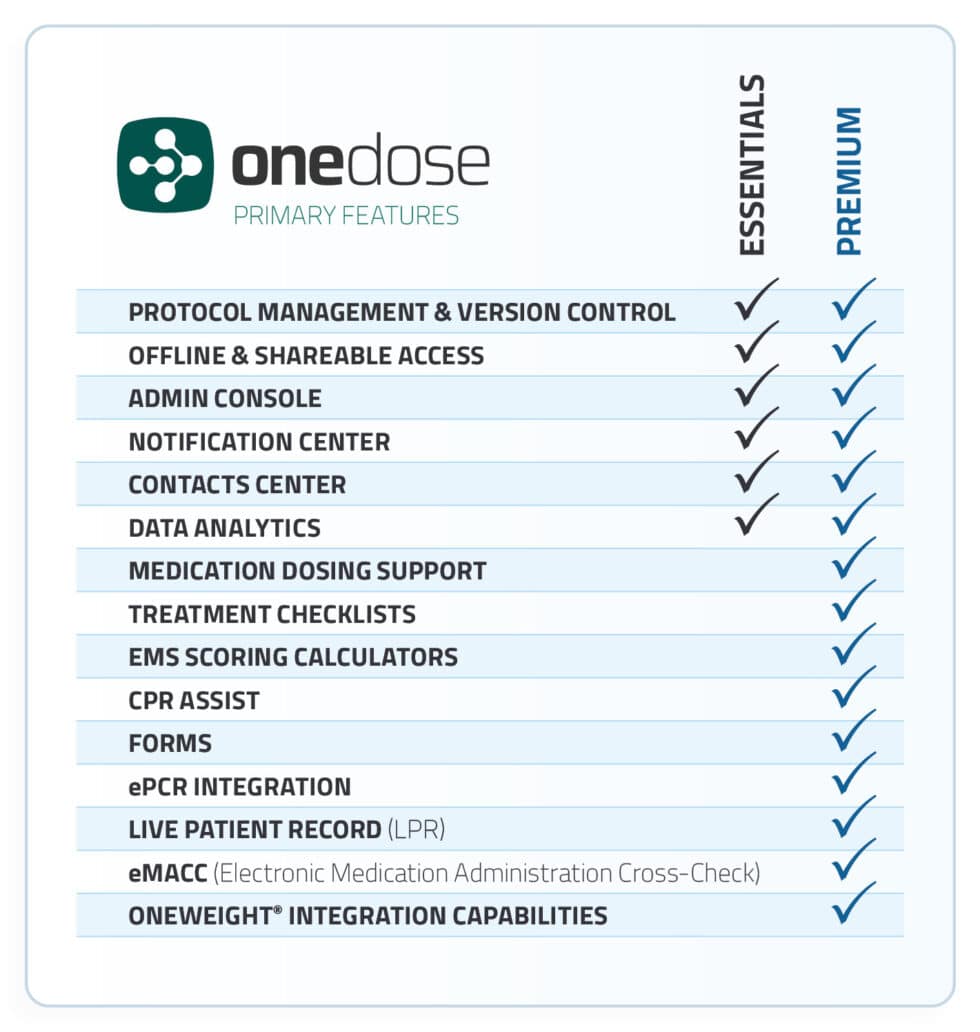
Compare plans in the matrix, watch the video, and see the questions agencies ask before upgrading.

OneDose plan comparison matrix
Upgrade

OneDose Premium overview

What an upgrade adds

Agency admins

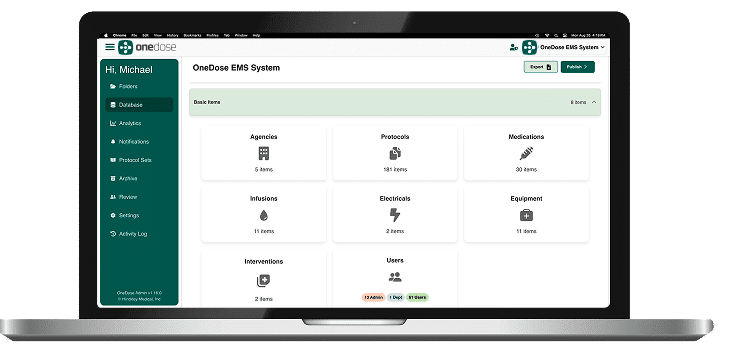
Run your agency in the Admin Console.

Agency Admins approved by NWCEMSS can manage users and turn medications on or off.

admin console

FAQ

Questions from NWCEMSS providers.

Don’t see yours? The help desk can help.

Help

Need a hand?

Who to ask when something gets in the way.

Something not working?

Use this form to report issues with the NWCEMSS OneDose app, or email helpdesk@myonedose.com.

Missing your code or PIN?

Your agency’s System Educator or EMS Coordinator has them, or you can request them with this form.

OneWeight for your agency

The OneWeight cot scale connects to OneDose for NWCEMSS at no additional charge.

See OneWeight · Subscription flyer · sales@myonedose.com

Want OneDose news now and then? Sign up for the e-news list.

Get the app

Get the OneDose app.

Available on iPhone, Android and the web. Then follow the steps to set up your account.