

OneDose Launches OneDose Credentials, an AI-Powered Credential Tracking System Built for EMS Agencies
August 30, 2026
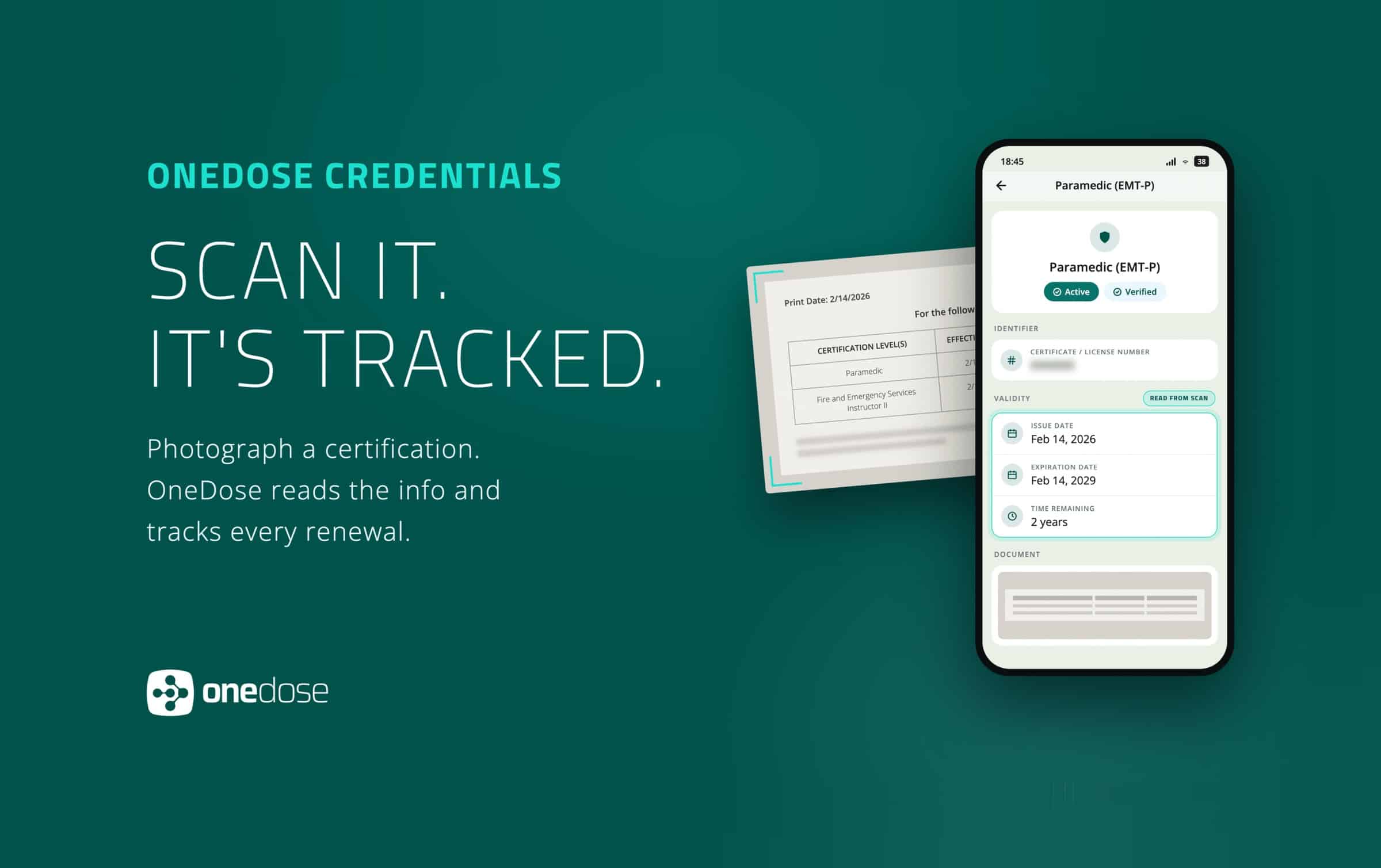
Providers photograph a certificate; OneDose reads it, files it, and tracks it to expiration.
Introducing OneDose Credentials, a credential tracking system that lets every provider add a certification by taking a picture of it. It is included with OneDose Premium at no additional cost.
How OneDose Credentials works
A provider photographs a certificate from the OneDose mobile app, or an administrator uploads a document in the OneDose Admin Console. OneDose extracts the text and matches it against the credential categories that the agency has configured, pulling out the provider’s name, the credential type, the issue date, and the expiration date, and returning a pre-populated record for review. Several documents can be scanned at once, and a document containing more than one credential is separated into individual records.
Where the system cannot confidently match a field, it leaves it blank, rather than guessing, and prompts the person to choose from the agency’s list. Every scanned credential is confirmed by a human before it is filed.
What administrators get
The Admin Console gives an agency one register for every credential its personnel hold. Each record carries the source document, issue and expiration dates, verification status, and a complete change history, and an analytics view rolls the roster up into what is active, expiring, expired, unverified, or missing a document, the questions an inspection actually asks. Credential types are the agency’s own: administrators define them across EMS, medical, fire, specialty, competency, and custom categories, down to locally defined specialty credentials, and the full register exports at any time.
What field crews get
Crews get their own credentials on their own phones. A Credentials tile appears on the OneDose home screen, and providers add credentials by scanning, uploading an image, or entering them manually. Renewal is another photograph, which updates the dates and the document together. The tile hides automatically during a patient interaction and returns when it ends, so credentials never compete for attention on a scene. Providers receive reminders at intervals beginning 90 days before a credential expires.
Why it matters
State rules require EMS agencies to hold current credential records for every person who works a truck. Pennsylvania, for example, requires a personnel roster carrying certification numbers and expiration dates, available for inspection at all times. Agencies meet that requirement in different ways: commonly a spreadsheet, or software that requires an administrator to enter every certificate by hand. Either way, every credential on the roster lands on one person’s desk.
“Every credential in EMS starts as a piece of paper in somebody’s hand, and somewhere down the line a person retypes it into a system. We decided the software should just read it. What used to be an administrator’s afternoon is now a few seconds on a phone,” said Colton Hazlett, Co-founder and Chief Technology Officer at OneDose.
Availability
OneDose Credentials is now available to OneDose Premium agencies and is included at no additional cost. To get started, an agency administrator must configure credential types before scanning will match them. The users then will see the Credentials tile populate on the OneDose app’s home screen.
Frequently asked questions
How accurate is the credential scanning?
OneDose reads the provider’s name, credential type, issue date, and expiration date off the document and hands them back for review. It handles naming variations, so “Advanced Emergency Medical Technician” resolves to AEMT. When it can’t confidently match a field, it leaves that field blank and asks you to select, rather than guessing. Nothing is filed until a person confirms it.
Can providers add their own credentials, or does an administrator have to?
Both. Providers add their own from the OneDose mobile app by photographing the certificate. Administrators can add credentials for any user from the OneDose Admin Console. Both paths use the same scanning.
Can I upload more than one certificate at a time?
Yes. Scan or upload several documents at once and each one is read separately. If a single document contains more than one credential, it is split into individual records.
Does this replace the credential tracking in our ePCR?
It doesn’t have to. OneDose Credentials works alongside whatever your agency uses today. The difference agencies notice first is who does the typing: if your current system needs an administrator to enter every certificate for every provider by hand, here the provider takes a photograph and OneDose reads it.
Can we create credentials specific to our state or region?
Yes. Administrators build custom credential types in any category, including Specialty, and scanning recognizes them as soon as they are created. Regions and states that credential providers individually for specific procedures can track those as their own credential types and see who currently holds them.
Who can see a provider’s credentials?
Agency administrators see the credentials of their personnel, and providers see their own in the app. Organizations with sub-agencies choose in Settings which sub-agencies are required to submit credentials.
What does OneDose Credentials cost?
Nothing extra. It is included with OneDose Premium at no additional cost.
Why don’t I see the Credentials tile yet?
An agency administrator turns on OneDose Credentials in the OneDose Admin Console, and the tile then appears on the home screen. The feature is rolling out over several days, so if your administrator has enabled it and you still don’t see the tile, give it a day and make sure your OneDose mobile app is up to date.