

One Record. Every Handoff. Zero Gaps.
March 18, 2026
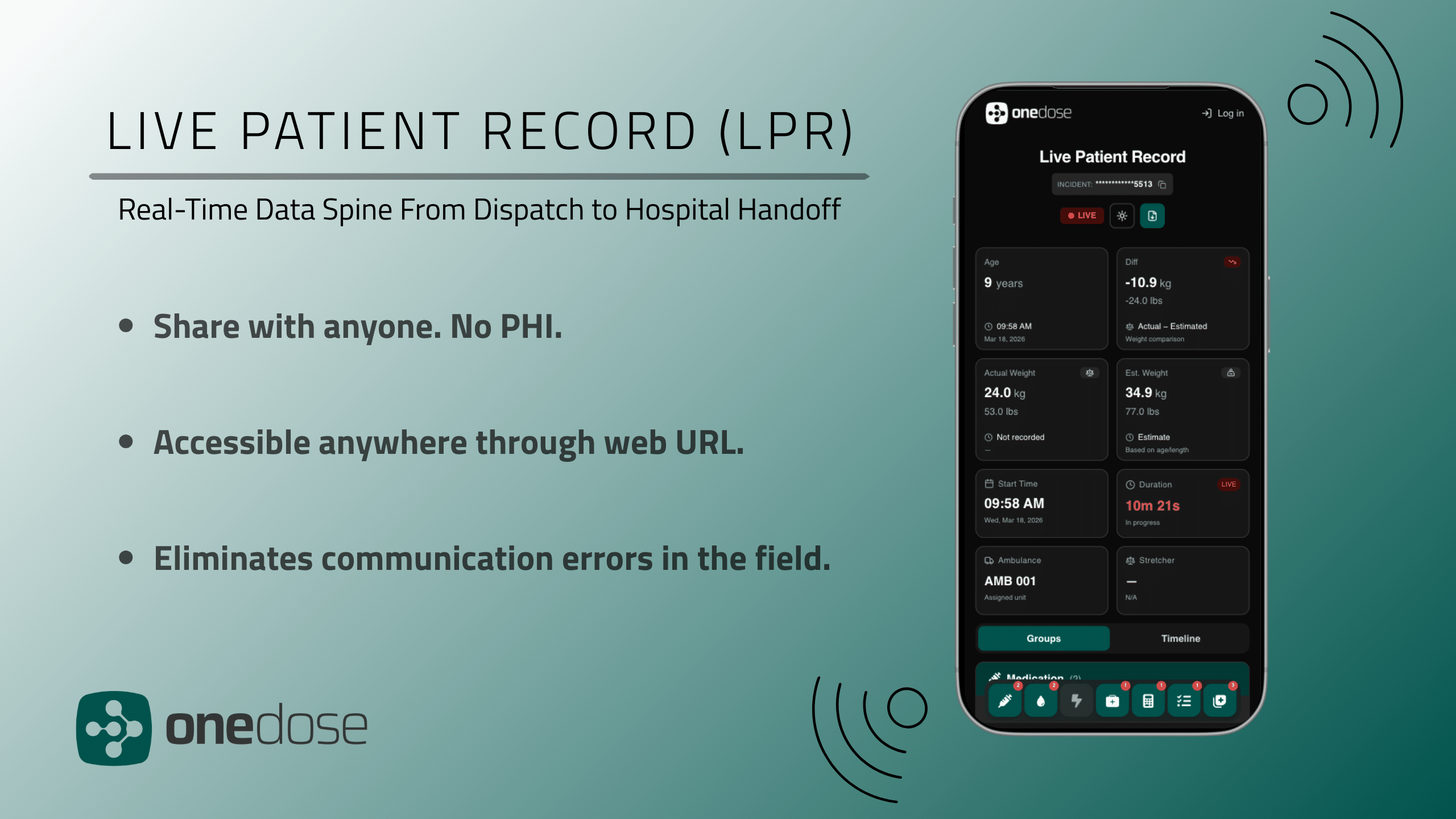
Introducing the Live Patient Record from OneDose
Every patient handoff is a moment where critical information can slip through the cracks. A first responder relays vitals verbally. A transport crew scribbles notes on a glove. A flight team pieces together what happened before they arrived. By the time the patient reaches the hospital, the full picture of their care is scattered across memories, radios, and paperwork.
The Live Patient Record (LPR) changes that.
OneDose’s newest feature is a real-time data spine that follows your patient from dispatch to hospital handoff, capturing every intervention, every medication, and every timestamp along the way. No Protected Health Information (PHI). No guesswork. Just a clean, shareable record of exactly what happened and when.
The Handoff Problem, Solved
The LPR is built for one main purpose: making patient transports seamless with no loss of patient care information.
Here’s what that looks like in practice. A fire first response unit arrives on scene and begins treatment. When an ALS transport unit takes over, the crew doesn’t start from scratch, they scan a QR code and instantly see every intervention performed on site. The first responders keep a record of what they did, and the transport crew walks into the call fully informed.
Now scale that up. Fire responds first. ALS takes over transport. A critical care flight crew picks up the patient mid-route. The patient finally arrives at the emergency department. With the LPR, every team along that chain is working from the same living record. One scan, and the next crew has the complete picture.
This kind of continuity across multiple agencies and handoffs has never existed in prehospital care. Until now.
From “Estimated” to Exact
One of the most impactful changes the LPR brings is precision in documentation. Traditional ePCR workflows rely on estimated times of administration, a medic’s best guess, entered after the fact. The LPR replaces that with exact timestamps captured in the moment.
This isn’t just a convenience upgrade. It’s a fundamental shift in the accuracy of prehospital data.
Everything Connected, Everything Shareable
The LPR starts at the moment of dispatch, and from that point forward, every action documented in the OneDose app flows into a single, unified record. Interventions like 12-leads, medication dosages, and procedural notes all live in one place, searchable, shareable, and ready to move wherever your patient goes.
And you don’t need to be on the OneDose platform to see it. Every time an LPR is started, a unique web link is automatically generated for that patient’s record. Share it with anyone: a receiving physician an hour away, a medical director monitoring from home, a specialist consulting remotely, or even the patient and family, and they can see every intervention as it happens, in real time, from any device with internet access. No app download. No account. No PHI. No barriers.
We believe nothing should stand between a patient and the best possible care. That means making critical information accessible to everyone involved, period.
Joining an active LPR on the OneDose platform is just as frictionless: scan a QR code or search from a list for instant access.
And because the LPR serves as a central integration point, the same data powering your patient record can flow directly into the systems that need it: ePCR platforms, narcotic tracking, inventory management, and prehospital alerting systems. One record, many destinations.
The Bottom Line
The Live Patient Record bridges the gap between what happens to the patient and the systems that need to know about it. It eliminates the information black holes between agencies, replaces guesswork with precision, and ensures that every patient arrives at their final destination with a complete record of their care.
CLICK HERE to view a Live Patient Record.
WATCH OUR WEBINAR to see how LPR works.
One record. Every handoff. Zero gaps.
About OneDose
OneDose is an AI-driven EMS platform that seamlessly connects clinical point-of-care solutions, from pre-scene to hospital handoff. By unifying protocols, dosing support, documentation, and real-time clinical tools into a single workflow, OneDose empowers emergency clinicians to deliver faster, safer, and more accurate care, even in the most unpredictable conditions. Learn more at www.myonedose.com
Ready to see the LPR in action? Contact sales@myonedose.com to schedule a demo.
Webinar transcript
Live Patient Record webinar
Welcome to our OneDose live patient record webinar. We're excited to demo this new feature for you all and show how OneDose can help streamline patient care in a way that hasn't been done before. So before we get started, I always want to cover our mission here at OneDose, which is to advance the first mile of healthcare by equipping every emergency clinician, agency, and hospital with intelligent, AI-powered support that improves accuracy, saves time, and saves lives. We're, you know, proud to support 4,000+ EMS agencies through both our software and our hardware.
And we are excited to continue to support more agencies as we continue to grow. Our speakers today are Tristen Hazlett, CEO and co-founder of OneDose, and Seth Gashwiler, our director of clinical services here at OneDose. Please feel free to drop any questions that you have in the chat and we will answer them at the end of this webinar. But without further ado, I will pass this on to Tristen. Hey everybody. As Lydia mentioned, my name is Tristen Hazlett, founder, CEO here at OneDose and Super excited to be bringing this product to the market for everyone.
So, what is the live patient record? So, LPR or the live patient record has been like a dream at OneDose for a while now. We talk about it as like connecting dispatch to handoff. Whether they hand off us to another EMS provider like a critical care helicopter or hospital itself, right? It's it's unique in every situation and we're super pumped to have finally like brought this dream to life. So, what is this magical technology that allows us to do this? Well, at its core, the LPR is a single like continuously updating patient record that lives across every device involved in the call.
So, think iPads, iPhones, Android devices, window devices. It doesn't matter where you're on this. It's going to live sync to it all. Multiple providers can view it at once, add to it. It's not like one person's going to override the other stuff that another person's doing, and no one's going to have to start from scratch or ever repeat themselves. So the best example is like think about how complex patient journeys can actually look like for high acuity patients specifically. So first you have fire first response arrives on scene you know maybe BLS and starts treatment right ALS takes over the transport and then a critical care flight helicopter comes and picks up the patient mid route and then the patient finally arrives at the emergency department maybe in another state and that chain of telephone is supposed to keep this information about what happened to the patient what's been done when was the last ketamine dose given is verbally done, right?
[sighs and gasps] it's just amazing to see, right? Four separate handoffs, four separate providers, each with a crit each for a chance with critical information to drop and every provider, whether on scene, transport, or seeming at the hospital with the LPR is working on the same record. So, there's really three things that I want you to take away from this overview. So, first, multi-provider real-time sync. Every device stays updated live. Whether you're the first crew on scene or receiving er doc, you're looking at the same data.
Second, frictionless handoffs across agencies and departments. So, across agencies and departments, you don't this works across different agencies in a different department. So, it's not just built for one, you know, OneDose user somewhere. It's built for them all. It's built for the real world where your BLS crews and your ALS crews transport might be completely different and different agencies. It doesn't matter. The record transfers cleanly. And lastly, and really importantly, and which we'll demonstrate, you actually don't have to have OneDose to receive this information.
The LPR generates a secure public web link that is PHI-free, and it's department and user agnostic. So, you're not going to be able to see that type of information. Simply just what happens with the patient so that anyone with that link, a receiving physician, an ER charge nurse, a flight crew, ALS can pull up the patient record on any device without downloading a single thing. Behind the scenes. We'll get into this a little bit.
It's a little harder to demonstrate, but this record doesn't just live in OneDose. So, this technology, the background, again, it's kind of where that magic happens. We have an open integration policy, and this makes it available for anyone to integrate easily. Think we already have all the ePCRs integrated, but think NAR tracking, inventory and analysts, inventory, you know, notification tools, alerting softwares. Anyone that would find what we're capturing at the point of care as valuable information to pull into their software is able to integrate with us free of charge and easily.
So, super excited about this. I'm going to pull up my screen and we are going to have a look at what this actually looks like. All right, get rid of that. Format this a little better. There we go. All right. So, one of the first things worth pointing out is that this looks very familiar, right? So, the LPR again, the power of what happens behind the scenes. So, if you have OneDose, if you used this before, this probably looks familiar to you.
But one of the things also worth pointing out with this LPR experience, which is a slightly different workflow than the OneDose app itself, is you don't have to add a patient input to start the LPR. You can see this button down here in the bottom right with the person and the plus simply by clicking that button. This record automatically will start. And why do we have that? Well, that's a great question. Another integration layer that you can build on top of this is integrations to dispatch.
So, you can build this out with your dispatch to that anytime dispatch is made to your department, it will automatically create an LPR. So that way, no matter what, you have a place with oldest patient data to live, whether it be in that web link or on the OneDose app itself. So I'm going to tap that plus button. And just like that, the LPR is live. Notice what happens to the screen. All the noise goes away. What's left is just the three tabs that are actually needed for an active patient call.
So on the far left, you have all the protocols still. In the same way that you would in the previous versions. In the center, you have all your point of care supports. All the way from your protocols, again, an easy way to get that information, medications, infusions, electrical equipment, checklist, forms, everything that's the core of our app is still available on that screen. And on the far right, this is new, right? So we have protocols home screen and now this is that live patient record itself.
So let's dive in and see what's changed on here. So at the very top I'm going to draw your attention to that little triangle with an exclamation point in there. Right, that incident number is specifically generated for this patients. It's automatically generated the moment an LPR opens. That's the thread that ties everything together. It's what your ePCR is going to reference when we push out the record and it's how you pull up this in your history. It's also how people can find live records in your agency.
So if I'm in OneDose EMS system, I can now look at my open logs if I'm an admin and or a user and see all the inst all the calls that are active and you can map it based off the incident number itself. All right, demo time. Continuing on that, patient information, you got no patient information in there right now. LPR providers, that is exactly, just what you would expect. This is I can set my shift up beforehand. So, for example, Seth and I on the same shift, I can set that up.
Obviously, we don't have any treatments yet. Maybe I'm still on my way to the scene. I can add patient inputs directly from here. Add providers to LPR. So, let's say that I know Seth's on his way and I want to beat him to it. I could add him there. Dismissed that. Transfer LPR. This is a very important tab. So, this is one that we're going to be demonstrating today. And this is how you can integrate or maybe integrate. I've overused that word.
This is how you can work with, you know, serious workflow different agencies that are using OneDose that may not be on your same instance. Ad providers using QR code, right? If they show up on scene and they're like I don't want to go through maybe you're a very busy agency and see all the open logs they can just scan and be added automatically and then that LPR that's that public link we will demonstrate here as well but to continue on let's put this in a real scenario and first let's create a persona right let's create this call that we know probably has happened many of times so me Tristen I will be a BLS first response non-transport, right?
So, someone that gets to the scene first, BLS providers, EMTs on board, but has it doesn't transfer the patient. Maybe they're dispatched in a fire truck or a different vehicle. And I've been dispatched to a 55year-old male. Let's just say roughly 220 pounds because we all know that every patient is roughly 100 kilograms. Oh, fat fingered that a little bit. There we go. So, we got 55-year-old patient roughly 220 pounds with chest pain. I get the call. I'm in route. I have my LPR open and my patient phone in there and we're on our way.
So, one thing that we always do, we can pull up our protocol just based off searching. So, I can have this ready for referencing on here. I can use my home team screen. And the way I like to do it is I like to have my protocol on the far left tab and I use my home screen to do all my documentation. Right. So I'm on my way there. Goals, indicators, documentation, checkpoints, everything I need to think before I ever set foot on scene.
I arrive on Spain and my patient is conscious complaining of subternal chest pain. So what am I going to do? I know because I do this all the time. I'm going to start with aspirin. So using our eMACC process scan aspirin right I can see my protocol that's there chest pain I click into that I confirm administration and anyone notice what happened is in my treatment activity now so I have a quick snippet it's going to be the last three as happens of my treatment activity right so it's it's timestamped, not an estimated entered after the fact, not at approximately, I don't know, 2:30 or 2:15 filled in during the charting an hour later.
It's the exact moment the medication was given and permanently part of this record and permanently tied to this incident number at the top here. This is the fundamental shift from how hospital prehosp documentation has worked historically. Traditional EPR workflows rely on the medic's best guess, were called, entered after the fact. LPR captures everything in the moment and that matters clinically and it matters for quality assurance and we all know that data gathering is the only way and good honest data gathering that's accurate is the only way that you're going to have really strong and successful QI QA.
So I'll throw in a couple other things here. Let's say that I started a 12 lead EKG document that maybe I gave some oxygen cuz again remember I'm just a EMT. So I got those logged in there. Aspirin 12 EKG have that with the trans transmission going on and oxygen started. So what I do now again I'm BLS I can't transfer this patient. I call Seth through dispatch however you want to do it. Seth's crew is coming. And this is where things get interesting.
So rather than Seth's crew showing up and getting a verbal report, even though he's at a different agency, again, this is a different agency, not inside the same one, they can come and transfer all the information from my dice to theirs. So, I'm going to bring up this transfer button. And what Seth is going to do, and obviously we can't share two screens at once. So he's going to pull out his device, take over this call, and mine is going to log locally.
So as he's doing that, I will mention so what this is going to save on mine is aspirin 12 lead and O2, right? And that can be pulled and saved locally to my device. So when I send click to ESO or First Due or ImageTrend or zil charts I'm just sending over my information on there. Seth, are you able to share your screen or am I blocking you? Oh, there you go. Should be good to go. Sweet. All right. So from that QR code, I can receive his log.
I just have to confirm the receive down here in the bottom righthand corner. It will give me a confirmation that transfer is complete. And now I have all the data that he entered and I can jump over to that patient log and I can see like he said those last three for the treatment activities, but I can still jump in here and view all of that. Now you can see his stuff does have PTA logged on it. So I know exactly what he did and when I start logging things I'll know exactly what I did.
If I ever need to double check we still have that incident number at the very top here. And again this is me coming from a completely separate agency. So it's not just interdep departmental anymore. It is you know from any point that you can put this out. We also have this sh share LPR link right here with the URL. And I'm going to pull this up and give you guys just a second to actually use that QR code to scan and then you guys can actually follow along on your desktops or on your devices whether you have OneDose downloaded or not.
This is going to allow you to have that live log as I'm doing stuff. So you guys will be able to see exactly what I'm doing as I'm doing it. There is no PHI like Tristen was saying earlier. There's also on this the URL, there's no personnel or department identifiers. So even if you know some nurse or doctor got upset that we did something wrong or this or that, they posted on Facebook and said, "Hey, look what this department did." There's no way to link anything you've done to any of these public URLs.
Tristen's also dropped a link in the chat if you guys can't do the QR code. All right. Then we hit done and we can get back to work. So I can go to my home and look up my stuff here. Chest pain patient. I know we're starting the IV. So we'll go to our interventions and start our IV. U maybe while they're getting another set of vitals, stuff like that. Gonna go ahead and get my protocol pulled up so I can reference that both PDF and my med dosing.
I know since you know vitals are stable enough, I can give my nitro. So I'll verify from here on that nitro, make sure we have everything correct and then I'll confirm the administration. You know, get a couple minutes down the road, we've got him in the truck. You know, another set of vitals. Still having chest pain, but it's actually relieved by that nitro. So, we'll go ahead and try a second one here. And since that one gave relief, we also have it to where we can start our infusions.
So I can go down here, double check this warning to make sure that patient doesn't meet any of these contra indications. I can click in this drip rate and select my drip tubing. Make sure that I have everything accurate as far as my calculations go and as far as my rates go. And then we're going to administer that to start our nitro drip. Now, the nice thing is while we go and route to the hospital, I can pull up my contacts, bring up my hospital, give them a call from the contacts feature, and then while I'm calling them, I can either get their email or a phone number or some way to send that code that I had you guys either do the QR code with or download that link for the URL and again they can see what's going on in real time.
So if you have that STEMI or stroke or something that's going directly to CT cast lab some kind of specialty care they can jump in there and see exactly what you're doing as you're doing it on the way to the hospital. That way you don't have to keep relaying the information. And again, there is no identifying information on any of this these features. All right. So, we get at the hospital, we've hanged it off. We can go back through and just double check everything in our log.
Clean up our routes of how we gave it. We're given report. We forget when something was done. Again, I can jump back in here and view all of this stuff in real time. And accurately logged. As long as that looks good, we can end and submit our LPR. That was successful. Your screen goes back to normal. So, I still have my notifications and my settings tab here if I need those. But if I go to my far left, I can come down to view records.
And just like before, we can jump into those previous logs, review these from here. I can print out a PDF or email a PDF. I can delete this or I can send that out to my PCR from here. And then that just sends out the cloud. You guys download it into your PCR, goes directly into your flowcharts, and then you just have to go in and clean up like who did what as far as the interventions and meds go. Awesome. Well done, Seth.
Thank you. So, that was the full patient journey. One record, two agencies, multiple providers, handed off to a hospital without a single verbal report duplicated. That information can be pushed to your ePCRs. Current integrations with ESO, First Due ImageTrend going live here in a couple weeks and many more smaller ones that are already completed. And what you don't see again is what's happening on the back end. So me being the EMS professional that was an EMT, I was able to do my record as well, right, with the same run number, pushing it to my ePCR, and then Seth was able to build upon it and send one to his ePCR.
So it's not when you transfer the log that you're kind of leaving the first providers hanging there.